
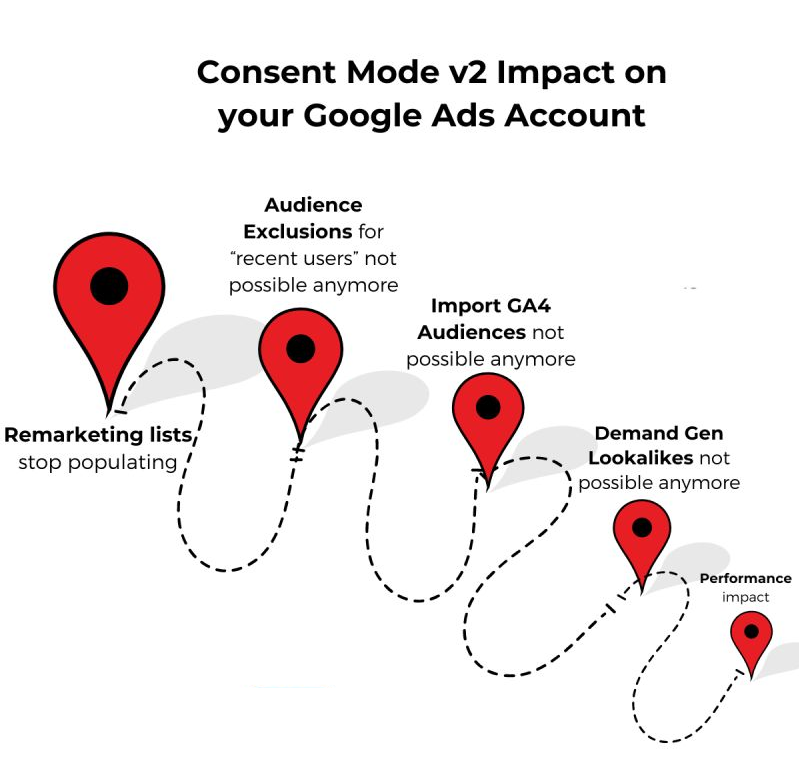
What Is Google Consent Mode V2?
Google Consent Mode V2 is a technical framework that connects your website’s cookie consent banner to Google’s advertising and analytics tags. When a visitor accepts or declines cookies, Consent Mode translates that choice into signals that tell Google tags what they are and are not permitted to do with that visitor’s data.
Version 2 introduced two additional consent parameters compared to the original release, giving businesses more precise control over how advertising data is collected and used. As of June 2026, it has also become the single control layer between your users’ consent choices and every Google product running on your site.
The Four Consent Parameters You Need to Know
Consent Mode V2 operates on four parameters. Each one maps to a specific type of data collection:
- ad_storage: Controls whether advertising cookies can be written and read on the user’s device.
- analytics_storage: Controls whether analytics cookies (Google Analytics 4 / GA4) can store data about the session.
- ad_user_data: Governs whether user data can be sent to Google for advertising purposes, including Customer Match and remarketing lists.
- ad_personalization: Determines whether Google can use this user’s data to serve personalized ads or retarget them based on prior site visits.
All four parameters must be explicitly configured. Leaving any of them unset or misconfigured means the tags may behave in ways that do not reflect your users’ actual choices, which creates both data quality problems and legal exposure.
What Changed in June 2026
The most consequential update arrived on June 15, 2026. Google removed Google Signals as a secondary data control layer. Previously, two separate systems governed how advertising data flowed from your Google Analytics property into Google Ads: Google Signals (configured inside Analytics) and Consent Mode (managed through your consent management platform). That redundancy is gone.
Consent Mode is now the exclusive control over advertising data collected by both GA4 and Google Ads.
This matters for two reasons. First, organizations that had disabled Google Signals as a deliberate privacy measure are no longer protected by that setting. Second, any misconfiguration in your Consent Mode setup, whether it was tolerated before because Signals provided a fallback, now produces direct compliance and data accuracy consequences. There is no backup system.
Later in 2026, Google also announced that the ad_personalization parameter will become the exclusive control for analytics personalization in linked Ads accounts, and that IP addresses will be encrypted before being passed to linked Ads accounts. Implementation timelines for these changes are still being confirmed, but organizations should factor them into their roadmap now.
Basic Mode vs. Advanced Mode: Choosing the Right Approach
Consent Mode V2 can be deployed in two ways. The choice affects how much data you recover from users who decline consent.
Basic Mode
In basic mode, Google tags do not fire at all until the user has made a consent choice. If the user declines, no data is sent. This is the simpler implementation and is generally sufficient for sites with low advertising spend or minimal remarketing activity.
Advanced Mode
In advanced mode, tags load immediately but operate in a restricted state. When a user has not yet consented, or has declined, tags send what Google calls “cookieless pings”: anonymized signals that include no personally identifying information, only timestamps, general browser data, referral URL, and consent status. No cookies are written, and no user-level tracking occurs.
These cookieless pings feed Google’s AI-powered conversion modeling. Because the model can observe anonymized patterns from declined-consent users alongside full data from consenting users, it estimates conversions that would otherwise go unattributed. Research from multiple consent management providers indicates that advanced mode typically recovers 30 to 50 percent more attributed conversions compared to basic mode. For businesses running significant Google Ads budgets, that gap has a direct impact on campaign optimization and reported ROAS.
Why It Is Mandatory in the EEA and Recommended in Canada
Google has required Consent Mode V2 for all advertisers serving ads in the European Economic Area and the United Kingdom since March 2024. Sites that do not comply lose access to remarketing audiences, conversion measurement, and the data modeling capabilities that inform automated bidding strategies.
In Canada, the picture is more nuanced. Federal privacy legislation under PIPEDA operates on an opt-out baseline for tracking, which means Consent Mode V2 is not strictly mandated at the federal level. However, Quebec’s Law 25 imposes explicit opt-in consent requirements that are meaningfully stricter and more closely aligned with GDPR standards. Under Law 25:
- No tracking technology may load before a visitor has actively accepted. This includes GA4 and Google Ads tags.
- Accept and reject options must be equally prominent. A buried “reject” link does not satisfy the standard.
- Analytics and advertising must be offered as separate consent categories.
- The banner must name specific tools (Google Analytics, Meta Pixel, etc.) rather than referring generically to “third-party cookies.”
- French-language consent notices are required for Quebec visitors.
- A preference centre must be accessible from every page so users can modify or withdraw consent at any time.
- Timestamped consent logs must be maintained.
A properly configured Consent Mode V2 implementation, built on a certified consent management platform, is the technical infrastructure that makes all of the above enforceable at the tag level. For any Quebec business running Google Ads or using GA4, it is the required starting point for Law 25 compliance.
How to Implement Google Consent Mode V2: A Practical Overview
Step 1: Select a Google-Certified Consent Management Platform
Google requires a certified CMP for EEA compliance and strongly recommends one for all markets. The CMP handles the consent banner, logs user choices, and communicates those choices to your Google tags. Common certified options include Cookiebot, Didomi, OneTrust, and CookieHub. Your choice should reflect your site’s volume, language requirements, and the jurisdictions you serve.
Step 2: Configure the Four Parameters in Google Tag Manager
Within GTM, you will configure default consent states (typically all set to “denied” on page load for advanced mode) and then update those states based on what your CMP reports back. Google Tag Manager has native Consent Mode support. Each parameter must be explicitly mapped to the corresponding category in your CMP.
Step 3: Verify the Signals Are Actually Reaching Google
This is where most implementations break silently. The banner appears, the tags fire, the dashboard shows green, but the consent signal never reaches Google. Use Google Tag Assistant or your CMP’s built-in diagnostics to confirm that the four parameters are firing with the correct granted or denied values on each page load, not just on the consent interaction itself.
Step 4: Update Your Privacy Policy
The June 2026 changes to how Consent Mode functions, specifically the removal of Google Signals as a parallel control, likely constitute a material change to how third-party data is shared from your site. Review your privacy policy to ensure it accurately reflects the current data flow and update it before your next consent banner review cycle.
Step 5: Confirm Shopify and E-Commerce Platform Compatibility
If your site runs on Shopify, note that the native Customer Privacy Banner does not fully support Consent Mode V2. Third-party Shopify apps or a custom implementation through GTM are required. This is a common gap for e-commerce businesses and one that leaves conversion data significantly underreported if left unaddressed.
The Impact on Your Analytics and Ad Performance
Beyond compliance, Consent Mode V2 directly affects the quality of the data feeding your campaigns. Without it, users who decline cookies are simply invisible. Your conversion volume is understated, your Cost Per Acquisition appears artificially inflated, and your automated bidding strategies (Target CPA, Target ROAS) are optimizing against incomplete data.
With advanced mode properly configured, Google’s modeling recovers a meaningful portion of that gap. For businesses in competitive markets with tight margins, that recovered attribution can be the difference between a campaign that appears to be losing money and one that is demonstrably profitable.
In AI-powered search environments, where Google’s Performance Max campaigns and AI-driven bidding rely heavily on signal quality, the accuracy of your consent configuration has compounding effects. Weak consent signals degrade the input data for systems that are already making autonomous decisions about your budget allocation.
Is Your Consent Mode V2 Setup Actually Working?
Most sites that have technically “implemented” Consent Mode V2 have silent errors. The most common issues are: consent parameters that default to “granted” instead of “denied,” CMP integrations that are connected at the banner level but not passed through to the GTM data layer, and missing parameter configurations for ad_user_data and ad_personalization, the two parameters added in V2 that many older implementations never included.
An audit of your current setup, not just a visual check of the banner but a full tag-level verification, is the only way to confirm your implementation is correct.
Index Web Marketing audits and configures Google Consent Mode V2 implementations for businesses across Canada, including full Law 25 compliance setups for Quebec. If you are not certain your current configuration is accurate, contact our analytics team for a setup review.
—
**Sources consulted:**
– [Didomi: Google Consent Mode 2026 Changes](https://www.didomi.io/blog/google-consent-mode-2026-changes)
– [CookieHub: Google Analytics & Google Ads Consent Mode V2 2026](https://www.cookiehub.com/blog/google-analytics-google-ads-consent-mode-v2-2026)
– [ConsentPixel: Canada Cookie Compliance 2026 (Law 25, PIPEDA)](https://consentpixel.com/blogs/canada-cookie-compliance-law-25-pipeda/)
– [Stape.io: Google Consent Mode V2 Explained 2026](https://stape.io/blog/google-consent-mode-v2)
– [Didomi: Google Consent Mode V2 What You Need to Know](https://www.didomi.io/blog/google-consent-mode-v2-what-you-need-to-know)
– [Digital Applied: Consent Mode V2 Implementation Guide 2026](https://www.digitalapplied.com/blog/consent-mode-v2-implementation-2026-seo-tracking-guide)